
Indexing requests go out when you publish
When a page is published, Anymorph asks Google to index it. This covers on-site pages and off-site posts. If a later check finds the page still not indexed, Anymorph asks once more. You don't need to press anything.
Indexing status on the Live tab
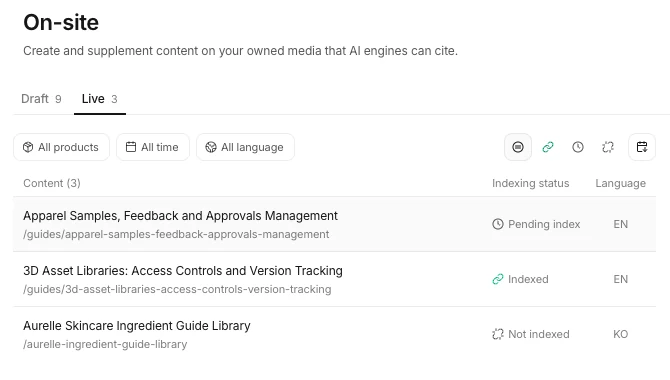 Each page shows its Indexing status. The example uses a fictional brand.
On the Live tab of On-site and Off-site, every page shows its Indexing status.
- Indexed: the page is in Google Search.
- Pending index: indexing was requested and is on its way. The days since the request (D+n) show next to it.
- Not indexed: checked, and not indexed yet.
- Not checked (Off-site): nobody has checked this post yet.
Indexing status without Search Console
For pages Search Console cannot inspect, including sites without Search Console connected, Anymorph checks Google Search and shows the result as the Indexing status.
Request it yourself
Open a page from the Live tab to find Request index. A page that already has a request shows Undo request.
Get the next update by email
When a new update ships, we send it to you in one email.