
One page to start from
Overview sits at the top of the sidebar and opens first. It gathers what needs doing this week and what changed in AI answers over the last 30 days.
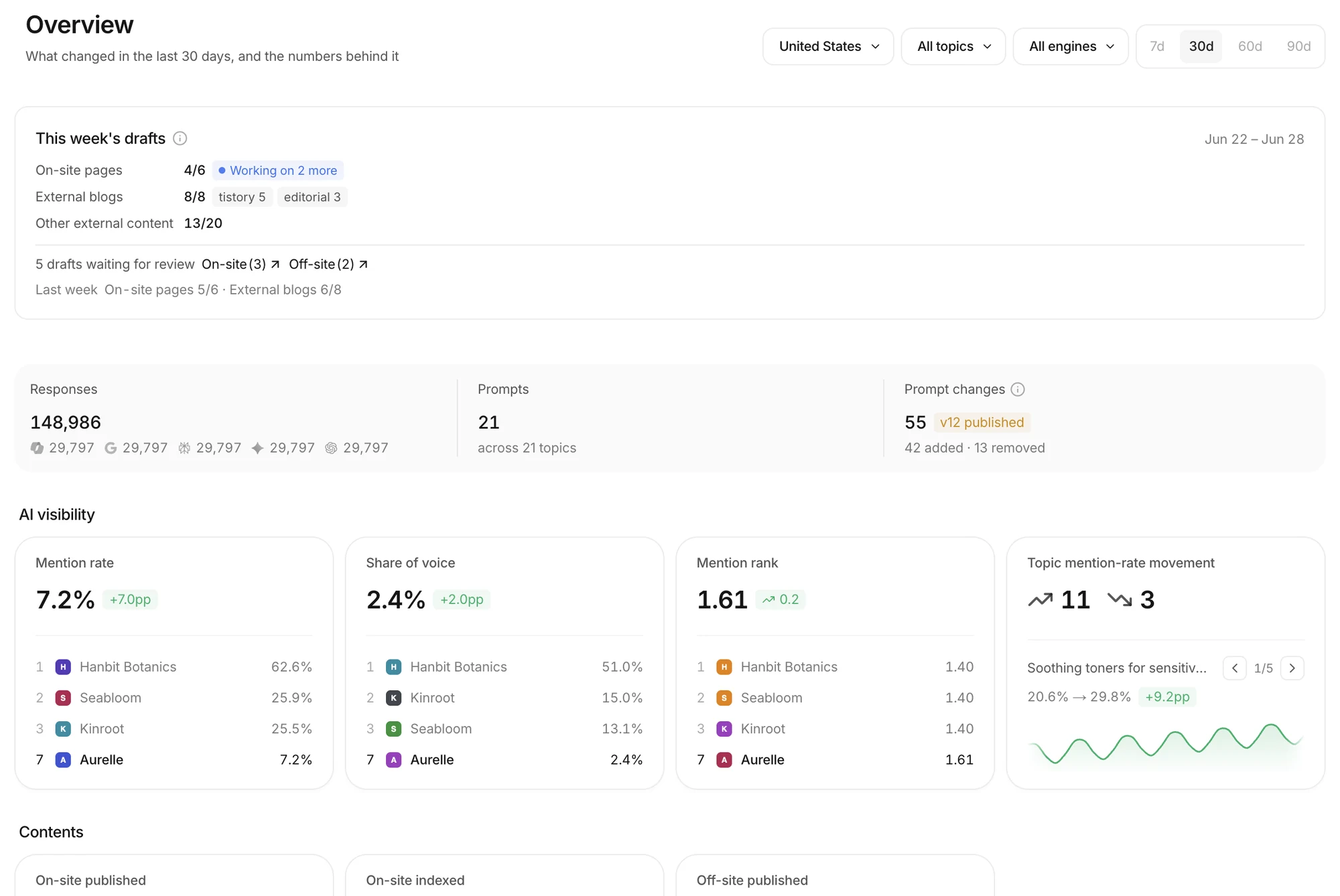 Read from the top: this week's drafts, what was measured, then AI visibility. The example uses a fictional brand.
This week's drafts
The This week's drafts card shows progress against the weekly goal.
- On-site pages and External blogs show how far each is toward this week's target.
- Drafts waiting for review counts on-site and off-site drafts separately. Click either to go straight to review.
- Last week's result sits underneath, so you can compare.
What was measured, and AI visibility
Below that are the Responses collected in the period (per engine), the Prompts you track, and any Prompt changes. Four AI visibility cards follow.
- Mention rate, Share of voice and Mention rank each show the change from the previous period, with the leading brands and your own position in the same card.
- Topic mention-rate movement steps through the topics whose mention rate moved most, each with its trend line.
- Contents at the bottom shows On-site published, On-site indexed and Off-site published.
Pick a topic, an engine and a period (7, 30, 60 or 90 days) at the top right and the whole page follows.
Tasks, for every member
Since September 29 every member of a workspace can use Tasks. See which stage each on-site and off-site piece is in, and set default owners for on-site and off-site work. Work left over from last week is gathered at the front of each stage.