
Try it free on one product page
Much of what a product page says is out of ChatGPT's reach: details that scripts load after the page opens, and text written inside images. Paste a product page URL into the free AI Dynamic Rendering sample, and we make an AI-ready page from it and show how much more ChatGPT reads.
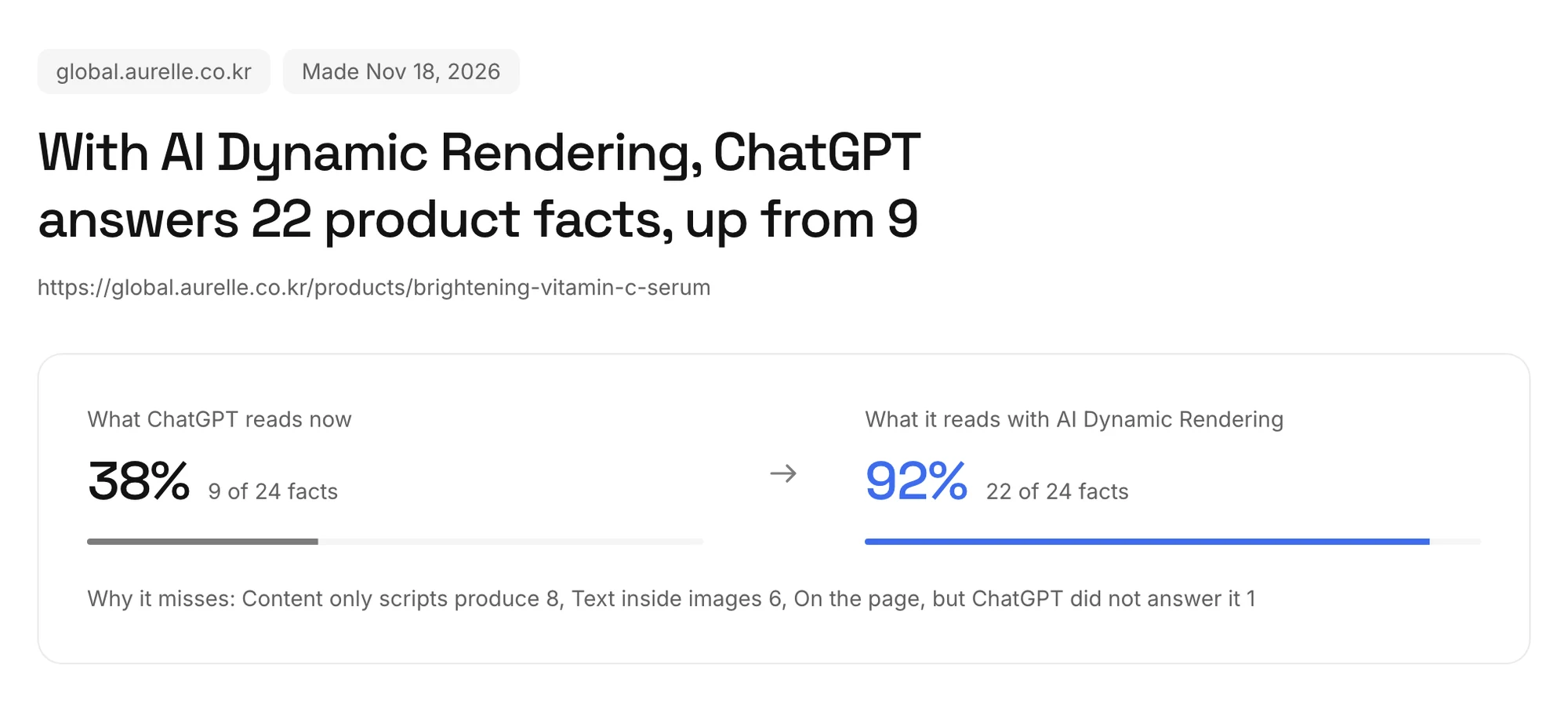 Left is what ChatGPT reads now; right is what it reads from the AI-ready page. The example uses a fictional brand.
- It's free and needs no sign-up. Each visitor can try it on one product.
- Enter just your shop's URL and we find product pages in its sitemap for you to pick from.
- We draw the page as a person's browser does and read the text inside its images. It usually takes one to two minutes.
- Why it misses groups the facts ChatGPT cannot read by reason, such as Text inside images.
- The result stays at its address, and Copy result link shares it with your team. The screenshot and the AI-ready page are kept for 30 days.
See the page AI gets now beside the AI-ready page
Under the score, the page ChatGPT gets now sits beside the AI-ready page. It shows exactly what came back when we requested the URL under ChatGPT's crawler names, so you can see which facts go missing.
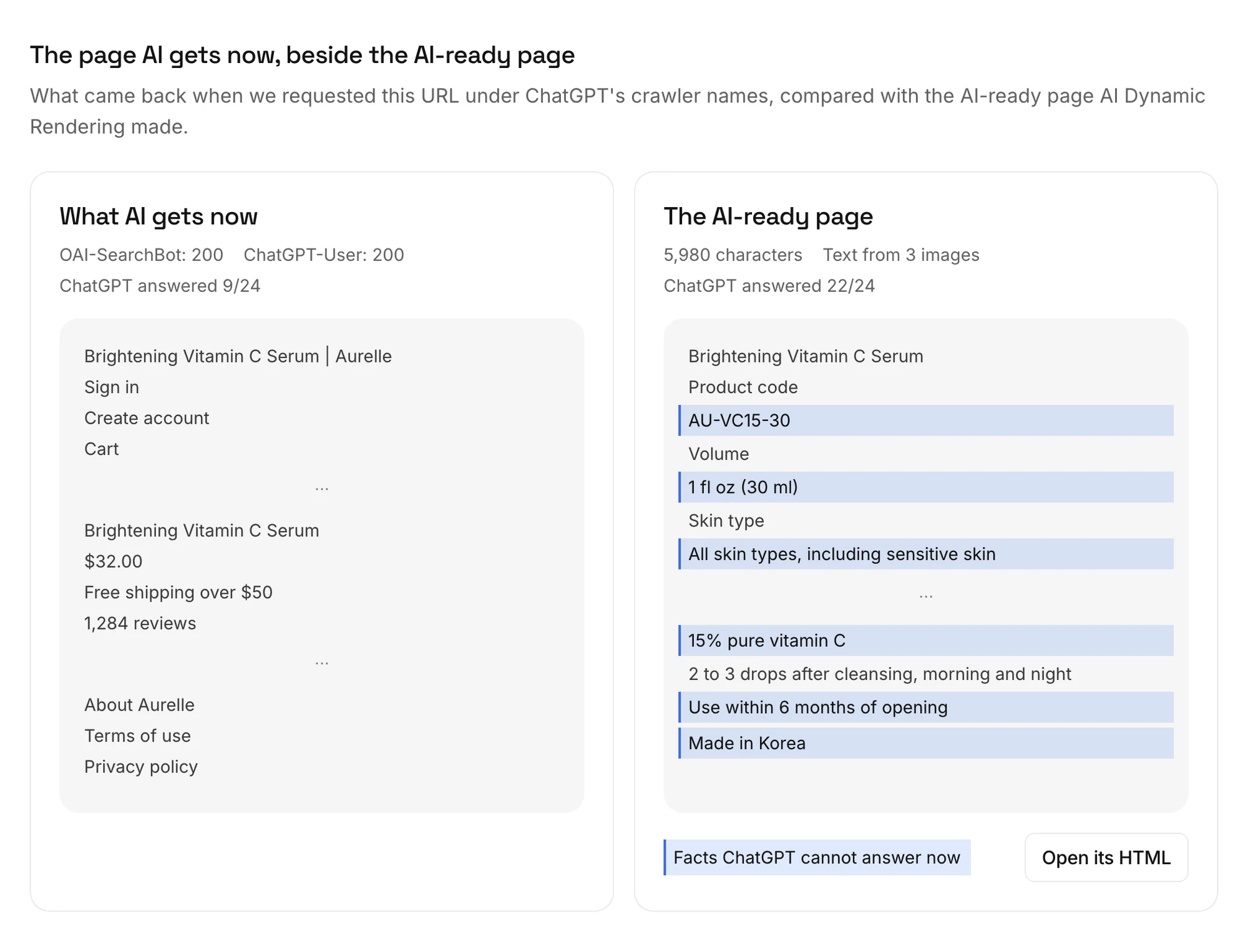 Lines in blue are facts ChatGPT cannot answer now. The example uses a fictional brand.
- What AI gets now shows the response codes for OAI-SearchBot and ChatGPT-User, so a site that blocks them shows up here.
- The AI-ready page shows its character count and how many images it read text from. Open its HTML shows the exact HTML AI agents would get.
- In ChatGPT's answers to the same questions, we ask about both pages with questions the page itself answers, and count the correct answers.
- The page a person sees marks the image areas ChatGPT cannot read on a screenshot.
Pay and connect your site right away
At the bottom of the result, Put AI Dynamic Rendering on every product page lets you set how many product pages to cover and choose Pay and connect now. Once you pay, the connect page opens and takes you from the site key to the connection check.
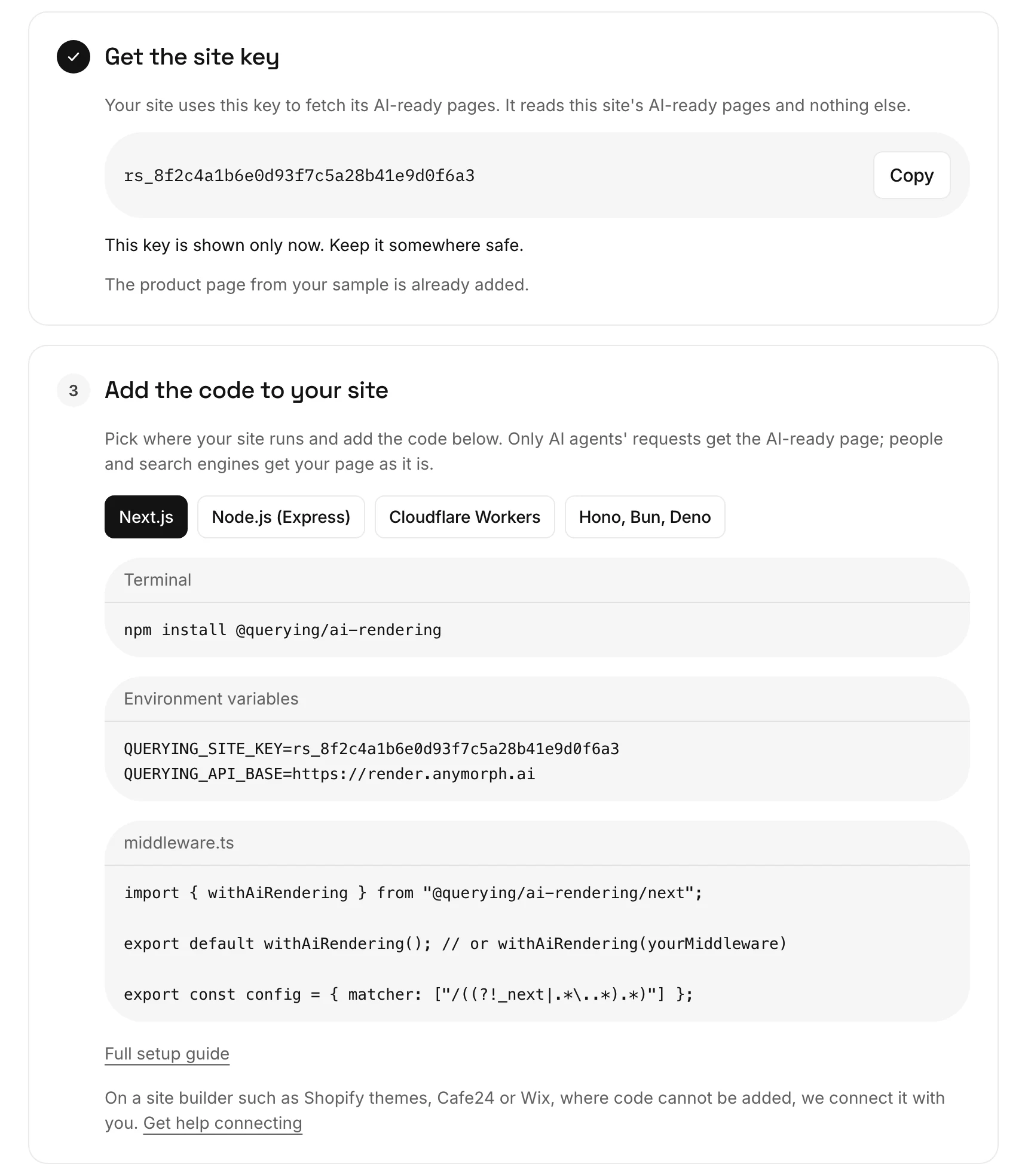 The site key is shown only once, and the one here is not a real key. The example uses a fictional brand.
- It costs $0.10 per product page a month. You can buy 100 to 10,000 pages right away and cancel any time.
- Get the site key: the key reads this site's AI-ready pages and nothing else. The product page from your sample is already added.
- Add the code to your site: pick where your site runs and copy the code for it.
- Add product pages: enter your sitemap's address and we add product pages up to the number you paid for.
- Check the connection: we request an added page as an AI agent and as a person, compare the answers and tell you what to check if something is off.
For more than 10,000 pages, or a site builder such as Shopify themes or Wix where code cannot be added, choose Talk to us and we connect it with you. Manage your payment method, receipts and cancellation in Billing.
People and search engines still get your page as it is
AI Dynamic Rendering sends the AI-ready page only when an AI agent asks for a page. People and search engines such as Google and Bing get your page as it is, so what your visitors see does not change.
- The AI-ready page goes to agents that open a page to answer a question, such as ChatGPT-User, Claude-User and Perplexity-User, and to the AI search crawlers OAI-SearchBot and PerplexityBot.
- Crawlers that collect AI training data (GPTBot, ClaudeBot) and classic search crawlers (Googlebot, Bingbot) get your page.
- The AI-ready page holds only text that is on the page a person sees. Text inside images is copied as written.
- We read your sitemap every 12 hours, add new product pages, and make the AI-ready page again for pages whose
lastmoddate changed. Every page is made again every 28 days, even without changes. - If the AI-ready page cannot be sent in time, the AI agent gets your page as it is.
Try it
- Start with the products your customers ask ChatGPT about most. You see right away whether ChatGPT answers questions the page already answers, such as ingredients, volume and how to use it.
- If Why it misses is mostly Text inside images, your details live only in images. The AI-ready page carries that text.
- If What AI gets now is empty, first check whether robots.txt, a firewall or bot protection blocks ChatGPT's requests. A blocked request cannot get the AI-ready page either.
- After adding the code, use Check the connection to see that AI agents get the AI-ready page.
- When a price or stock level changes, update the page's
lastmodin your sitemap. The next sitemap read brings the change into the AI-ready page.
Get the next update by email
When a new update ships, we send it to you in one email.